CSUMB Data Glossary Refresh: Easier Navigation, A Familiar Look
The CSUMB Data Glossary has a refreshed look and a redesigned home page to help Campus Data Warehouse users find definitions and support more easily.
This update is part of Institutional Assessment & Research’s broader user experience initiatives to improve navigation and discoverability across our data tools. Feedback from Campus Data Warehouse users highlighted the need for clearer pathways to information and more help interpreting dashboard fields, filters, and metrics. The glossary refresh is one step toward addressing those needs.
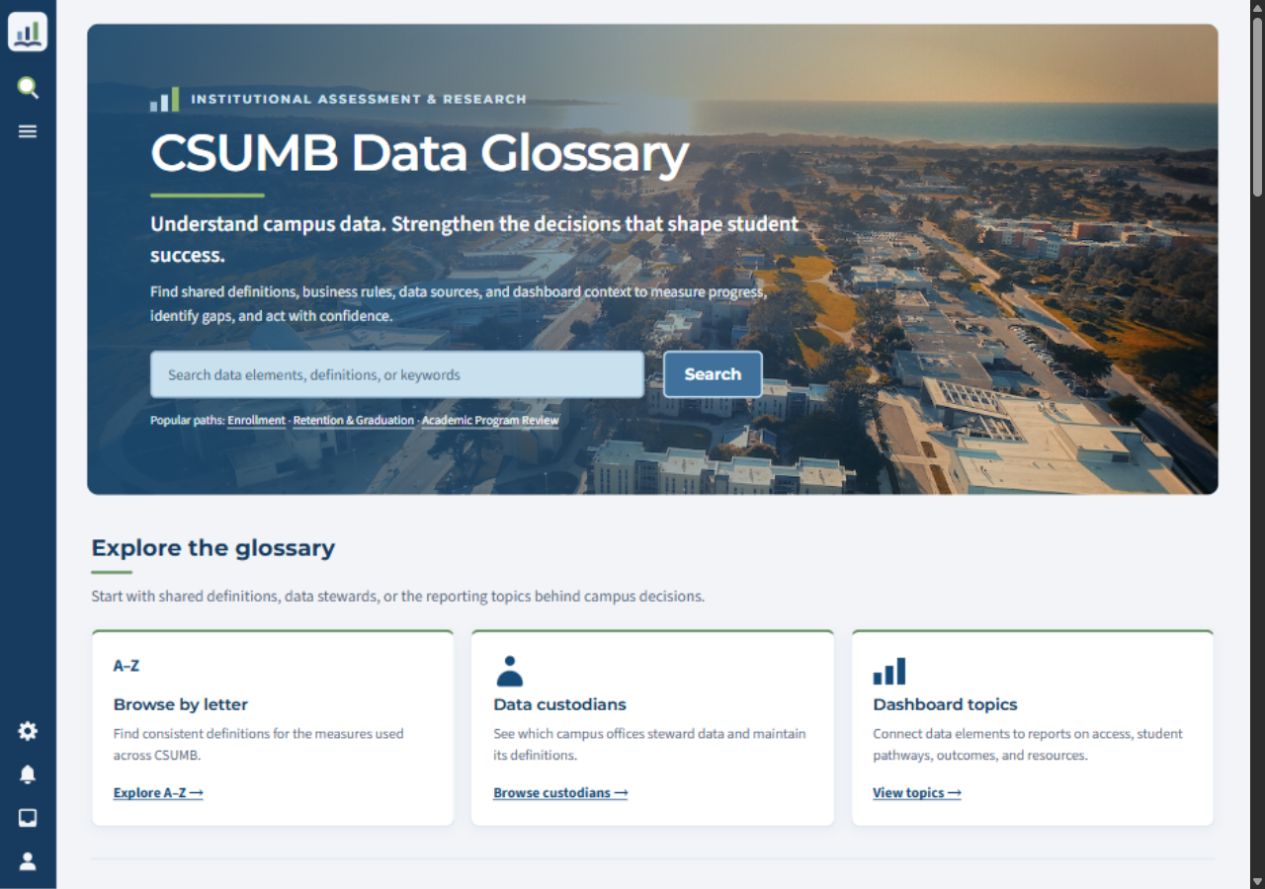
The redesigned home page brings search and browsing options into one clear starting point.
A familiar campus look, with a more responsive interface
We have moved from the previous Vector interface to Citizen, which provides a more responsive and streamlined experience across desktop, tablet, and mobile screens. Updated colors, typography, and campus imagery bring the site into closer alignment with Cal State Monterey Bay branding, creating a look and feel that is more familiar to our campus community.
From the home page, you can search for a data element, browse data elements alphabetically, explore dashboard topics, or find data elements by data custodian.
Get to know the search and menu icons
One of the most noticeable changes is the compact and responsive site navigation. On desktop, look for the icons along the left side of the page. On smaller screens, the navigation shifts to a bar at the bottom.
- 🔍 Search: Select the magnifying glass to open the full Search page. Enter a data element name, acronym, or keyword, then choose a result. You can also use the search field on the home page. See Using the Search box for illustrated instructions.
- ☰ Menu: Select the three-line menu icon to open navigation and support links from any page. Glossary Support includes help using the glossary, common acronyms, additional definition resources, the custodian review process, and feedback. Data User Support connects you with warehouse guides and tutorials, the reporting schedule, majors documentation, and IAR assistance. See Browsing for Glossary Terms for an illustrated tour.
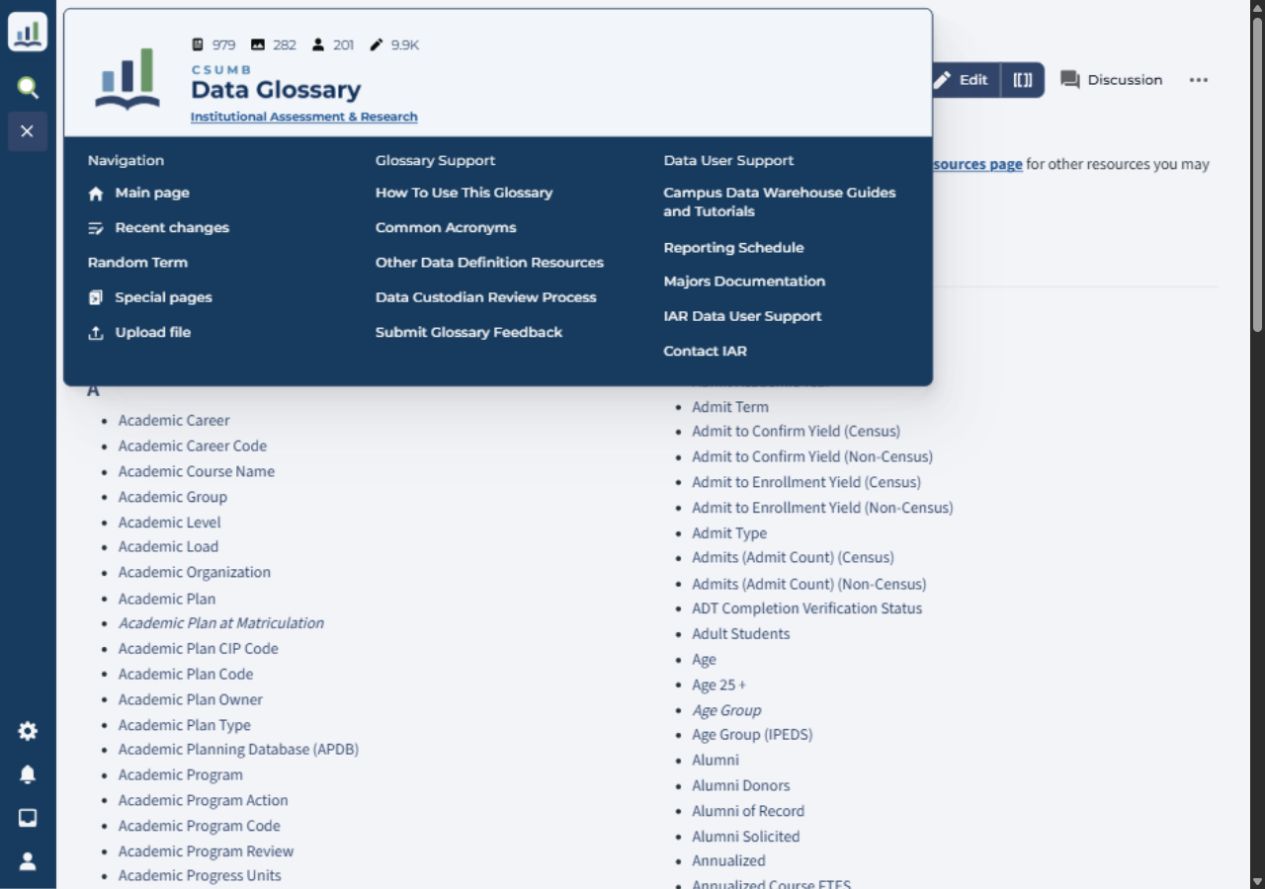
The magnifying glass opens search. The menu icon opens these support links; it changes to an X while the menu is open. On mobile, the menu sections stack vertically.
You can also visit How To Use This Glossary for quick links to both guides, Common Acronyms, and Other Data Definition Resources.
The glossary’s overall functionality remains the same
You can continue to search and browse entries, read definitions and available metadata, and follow links to related terms and resources. This first phase focuses on the glossary’s presentation and navigation. All existing dashboard pages with associated data elements continue to function as normal. Users can still follow the CSUMB Data Glossary links from each dashboard in Campus Data Warehouse to a list of the data elements associated with that dashboard.
What comes next?
This is the first phase of our initiatives to enhance the Data Glossary. We are also in the early stages of improving dashboard metadata, the information that explains the context and use of our campus data, and category tagging in the data glossary to help users discover related terms and reporting resources.
Our broader direction includes clearer dashboard descriptions, examples of questions dashboards can answer, stronger connections between glossary terms and reporting tools, and more consistent maintenance of shared information. Future work will also strengthen definitions and business rules with data custodians and explore navigation that starts with the questions users need to answer.
These improvements will develop in phases, with opportunities for user feedback along the way.
Explore the refreshed glossary and let us know what helps you find your way, or where you still get stuck. Use Submit Glossary Feedback under Glossary Support in the site menu to share suggestions.